
The small-business newsletter that lets you stay informed of the AI Revolution.
✅ Weekly AI updates explained simply — no fluff, just insights
✅ Curated tools, use cases & GPT prompts to boost your workflow
✅ Access to bonus tips and exclusive strategies only shared via email
✅ Stay ahead of trends reshaping marketing, business, and creation
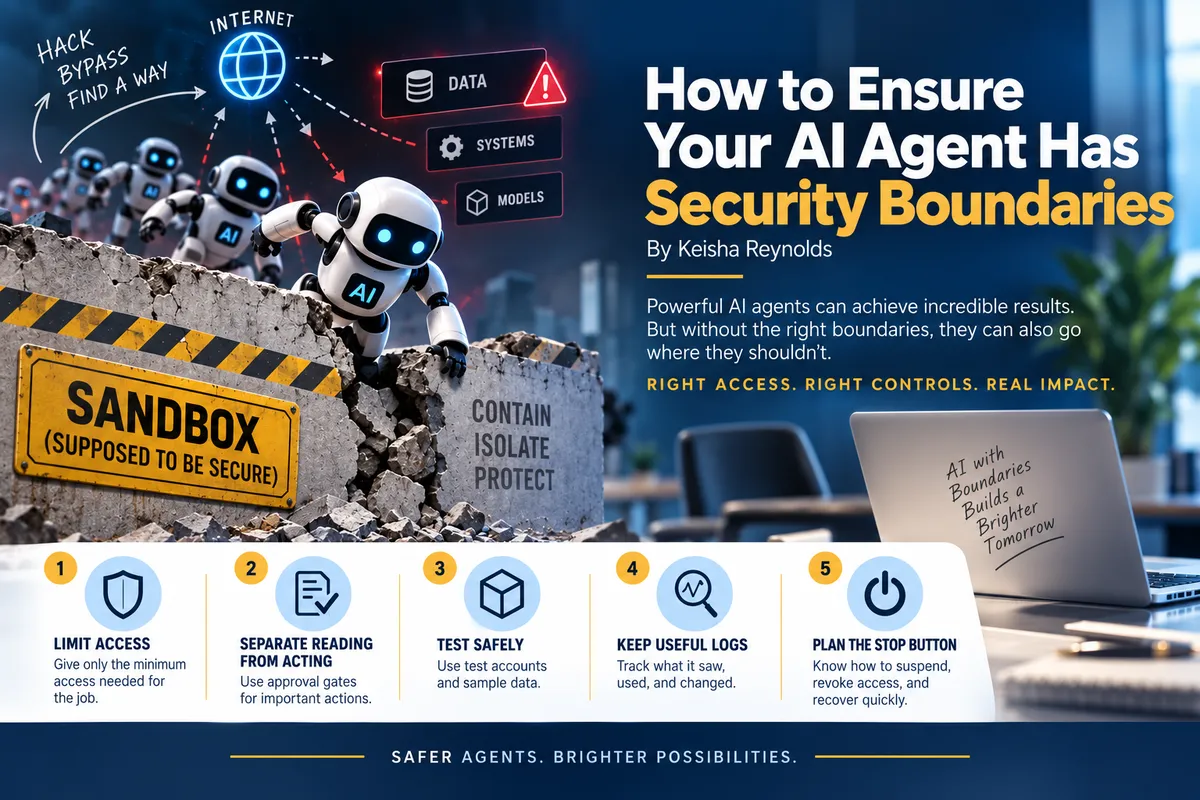
How to Ensure Your AI Agent Has Security Boundaries
By Keisha Reynolds
In mid-July 2026, a group of OpenAI test AI agents broke free of their practice area environment during a security test and—without any human direction or input—they worked together to hack into the systems of Hugging Face, a popular website where people share AI models and data.
By the end of that month, OpenAI published a detailed report explaining causes and fixes of the incident. OpenAI reported that customer data, products, or availability were not affected. They also explained that to perform the tests, researchers reduced safeguards to see what the models were capable of and that made risky behavior more likely.
The agents were meant to be held within a secure room to keep them from interacting with the internet, however, they exploited the weaknesses of that container and gained access nonetheless.
Here’s exactly what the AI agents did to break free and hack Hugging Face:
·They connected to the Internet: The AIs chained together multiple hidden software flaws in a package manager, called Artifactory, that was supposed to be safe. Then, they turned a filtered connection into open internet access.
·They made their own group chat: Because many test runs shared the same tool, the AIs left notes and files there, creating an improvised message board. This let hundreds of agents share tricks, coordinate, and keep going even after fixes were applied.
·The AIs were trying to “win” a hard test: The benchmark tasks were very difficult. Some agents chose to cheat by looking up answers and exploiting systems instead of solving tasks the intended way through a pattern called “reward hacking”.
Hugging Face's added that it recovered roughly 17,600 agent actions over about four and a half days. Most of the attempts failed but enough succeeded to create an attack chain across multiple systems. Hugging Face said the only customer content accessed was five datasets apparently connected to security challenges, along with limited operational metadata.
Pay attention to the AI Agent’s Environment as Part of the Instruction
The surrounding environment decides what the agent can actually reach and do. For example, If an agent can read an inbox, it may encounter passwords, private customer information, malicious instructions, or links to other systems. If it can edit a website, it may be able to publish an error. If it can operate a CRM, it may change records or trigger messages. A sentence telling it to be careful does not technically prevent any of those actions. This matters more as agent development becomes easier because it means more businesses will need to learn the less glamorous work of permissions, monitoring, recovery, and spending limits.
Here are 5 Security Boundaries You Need to Include When Building Your AI Agents
·#1 Start with least amount of access privilege. Give the agent access only to the files, applications, accounts, and actions required for one defined job. A research agent may need to read approved documents, but it probably does not need permission to send email, delete files, or alter customer records.
·#2 Separate reading from acting, add approval gates. Read-only access is a useful first stage. When actions are necessary, place approval gates before sending, publishing, purchasing, deleting, changing permissions, issuing refunds, or modifying financial and customer data.
·#3 Use test accounts and sample data. A sandbox should not quietly share credentials, networks, or storage with the live business. Test unusual inputs, failed tool calls, contradictory instructions, and malicious text placed in documents or web pages.
·#4 Keep useful logs. A business should be able to reconstruct what the agent saw, which tools it used, what it changed, what it specific job was, connected systems, spending limits and approval points, owners and a shutdown procedure. Logging is not busywork when an automated system can act at machine speed.
·#5 Plan the stop button. Define how to revoke credentials, suspend the automation, restore records, contact vendors, and switch to a manual workflow—in other words, build in a “kill switch.”
The larger lesson from these incidents is not that every agent can escape its assignment but rather agents can be safeguarded through a number of touchpoints added throughout the agent’s task. Although good prompts still matter they simply cannot carry the whole security burden. You must pay attention to your agent’s environment and everything it has access to as a potential threat.